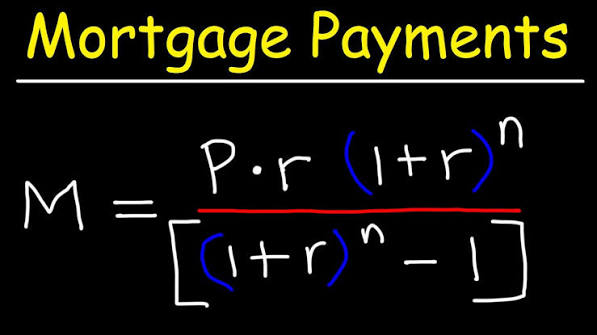
Last updated: September 10, 2026
Key Takeaways
- A 30-year mortgage is 360 monthly payments, while a 15-year mortgage is 180.
- A 25-year loan runs 300 months.
- Verify the day count method if it is shown, such as actual/365 or 30/360.
- It is the cumulative effect over 60, 120, or 180 payments.
A mortgage amortization calculator basics — complete guide shows how each payment gets split between principal and interest, how the balance shrinks over time, and how extra payments move up the payoff date. This mortgage amortization calculator basics — complete guide is for someone who already knows the loan amount, rate, and term, and wants enough math to check a lender’s numbers, compare scenarios, or see why the balance barely budges at first.
Information only. For your own situation, consult a qualified adviser, lender, or tax professional before you sign anything. Mortgage rules, tax treatment, and lender practices vary by country and can change; see the Consumer Financial Protection Bureau mortgage resources and your local regulator for current guidance.
What a mortgage amortization calculator actually tells you

A mortgage amortization calculator basics — complete guide gives you the payment schedule, not just the monthly bill. That schedule shows each installment divided into interest and principal, which is the part of the loan you actually repay. “Amortization” means the gradual reduction of a debt through scheduled payments over a fixed term, such as 15, 20, or 30 years.
That difference matters because two borrowers can share the same monthly payment and still face very different total interest costs if the rate, term, compounding convention, or extra payments differ. A plain payment calculator hands you one number. An amortization calculator shows the road to that number.
For a standard fixed-rate mortgage, the schedule comes from four inputs: loan amount, interest rate, payment frequency, and loan term. The calculator applies an interest formula to the remaining balance each period. Early on, more of each payment goes to interest because the balance is still high. Later, more goes to principal because the balance is smaller. That shift is the heart of amortization.
Here is the question worth asking: is the calculator using the same assumptions as your actual loan? A schedule built on a 30-year term with monthly compounding is not the same thing as a loan with biweekly payments, an adjustable rate, or a mortgage that has mortgage insurance, escrow, or a balloon payment. Those items can change cash flow without changing the core amortization math. Apples and oranges.
A good calculator also lets you inspect a full table, not just a summary. Look for columns such as payment number, date, payment amount, interest, principal, and remaining balance. If the balance does not end near zero after the final scheduled payment, something is off in the assumptions or rounding.
This is also where the terminology matters. Principal is the original borrowed amount that remains unpaid. Interest is the cost of borrowing. Payment frequency means how often you pay: monthly, biweekly, weekly, or another schedule. Compounding means how often interest is calculated and added to the balance, and lenders do not all use the same convention. In some countries and loan types, those details are spelled out in disclosure documents rather than in a calculator screen.
I would treat any calculator output as a planning tool, not a promise. Useful? Absolutely. Perfect? No. It helps you compare structures and ask better questions, but it is only as accurate as the inputs. If you do not know whether your loan uses monthly interest accrual, whether there is a rate reset, or whether fees are financed, the schedule will look precise while still being incomplete; for a final decision, consult a qualified professional and review the lender documents.
How do you use a mortgage amortization calculator?
You use a mortgage amortization calculator basics — complete guide by entering the loan amount, the interest rate, the loan term, and the payment frequency, then checking whether the schedule matches the loan documents. Straightforward. The devil is in the setup, because one wrong input can throw off the whole payoff table.
- Enter the original loan amount exactly as funded. Use the amount actually borrowed, not the home price. If closing costs were rolled into the loan, include them only if they are part of the principal balance. Verify that the starting balance matches the note or closing disclosure. A mismatch of even 1 unit means the opening row is already wrong. Tiny error, big mess.
- Use the stated interest rate and confirm whether it is nominal or effective. A nominal annual rate is the quoted rate; an effective rate reflects compounding. If the loan contract gives a nominal rate such as 6.25% with monthly payments, the calculator must know the payment frequency. If the calculator asks for APR, do not substitute it unless the tool is clearly designed for APR-based comparisons. A problem shows up when the first interest charge is too high or too low compared with the lender’s estimate.
- Select the exact term in months or years. A 30-year mortgage is 360 monthly payments, while a 15-year mortgage is 180. A 25-year loan runs 300 months. Verify the final payment date or payment count. A common error is entering 30 years for a loan that has a 25-year amortization period, which makes the balance decline too slowly.
- Match the payment frequency to the loan contract. Choose monthly, semi-monthly, biweekly, weekly, or another stated cadence. If the lender uses biweekly payments, the schedule is not the same as monthly payments divided in half. Verify the number of payments per year. A problem appears when the schedule shows one payoff date but your lender’s statement shows another.
- Check the compounding assumption if the calculator offers one. Some loans accrue interest monthly, others daily, and some use different conventions for variable-rate products. If the calculator allows daily interest, make sure it matches your loan. Verify the day count method if it is shown, such as actual/365 or 30/360. If the tool does not mention compounding at all, it may be too simple for a precise comparison.
- Generate the amortization table and inspect the first 3 to 6 rows. The early rows should show an interest-heavy payment and a modest principal reduction. Verify that each payment equals the scheduled amount unless escrow or fees are separately displayed. A problem exists if the principal column is larger than expected on the first payment or if the balance rises instead of falls.
- Scroll to the final 1 to 3 rows and check the ending balance. A standard amortization schedule should end at or very near zero after the final payment, subject to rounding. Verify whether the calculator adjusts the last payment for pennies or carries a small residual balance. A problem appears when the final balance is still substantial, which usually means the term, frequency, or rate was entered incorrectly.
- Add one extra-payment scenario at a time and compare the revised payoff date. Enter either a one-time lump sum or a recurring extra amount, such as an additional payment each month. Verify whether the calculator applies the extra directly to principal and whether it recalculates future interest. A problem appears if the tool reduces the payment instead of shortening the term when you expected term reduction, or if it charges the extra against future scheduled payments in a way that does not match your lender’s rules.
A useful check is simple arithmetic. For a fixed-rate mortgage, the sum of all principal columns should equal the original loan amount, and the sum of all interest columns should equal the finance charge over the life of the loan. If the totals look impossible, the calculator may be hiding fees, using a different compounding rule, or rounding too aggressively.
I also pay attention to whether the calculator handles dates, not just payment counts. A 12-month schedule starting on the first of the month is not the same as one starting on the 29th if the lender uses actual calendar dates and daily interest accrual. That can matter in the first few payments, especially when the loan closes near month-end.
Why does the balance drop so slowly at the start?
The balance drops slowly at the start because early payments mostly cover interest on a large outstanding principal, leaving only a small remainder to reduce the debt. That is how an amortizing loan works, and it is why the payment can feel expensive even when the balance barely moves.
Think of the first payment on a long-term mortgage as doing two jobs. One job is paying the cost of borrowing for the period that just passed. The other job is shrinking the principal so the next interest charge is calculated on a smaller amount. When the balance is large, the first job dominates.
That pattern is not a flaw in the calculator. It is the right result of the amortization formula. A fixed payment is set high enough to retire the loan by the end of the term, but the lender still calculates interest on the unpaid balance each period. With a 30-year term, the principal reduction in the first year can be modest compared with the total payment. With a shorter term, such as 15 years, the principal portion grows faster because the payments are larger and the balance is scheduled to disappear sooner.
This is where many readers misread the table. They look at the first 12 lines and think, “I am not making progress.” But the relevant measure is not just what happens this month. It is the cumulative effect over 60, 120, or 180 payments. The early schedule tells you how much of your cash flow goes to carrying the debt, and that is useful for planning, but it does not tell the whole story. Slow burn, not no burn.
A second reason the balance seems sticky is rounding. Most calculators show cents, but the internal math may carry more decimal places. The displayed balance can look like it is off by a few cents until the final payment is adjusted. That is normal if the tool is honest about rounding. It becomes a problem if the residual balance is more than a small rounding difference, because then the schedule likely uses the wrong term or payment frequency.
The practical takeaway is not “avoid amortized loans.” It is “read the schedule correctly.” The first 2 or 3 years reveal how much interest cost you are carrying during the period when the balance is still highest. That is useful if you plan to sell, refinance, or make extra payments before the midpoint of the loan. If you expect to hold the loan only briefly, the early interest-heavy years matter more than the headline rate.
What should you check before trusting the schedule?
You should check the loan type, the rate structure, the payment cadence, and the rounding rules before treating the schedule as reliable. A calculator can be perfectly consistent and still miss your loan if the assumptions do not match.
Start with the loan type. A fixed-rate mortgage has a stable payment formula, which makes amortization easy to model. A variable-rate or adjustable-rate mortgage can reset after an initial period, often changing both the payment and the total interest path. If the rate can change, a single static amortization table is only a snapshot. It may help, but it is not the whole loan.
Next, confirm whether the payment includes escrow for property taxes and insurance. Escrow is not part of principal amortization, but it affects the amount you pay each month. A calculator that merges escrow into the mortgage payment can make the amortization line look larger than it really is, because the extra cash is not reducing principal. If the tool separates them, good. If not, you need to strip escrow out before comparing schedules.
Then check fees and insurance premiums. In some loan structures, fees are financed into the balance, which increases the amount subject to interest. In others, they are paid separately at closing and do not belong in the amortization table. Mortgage insurance, lender fees, and discount points can be treated differently depending on jurisdiction and loan program, so consult a lender or tax professional if you need the exact treatment. A calculator that ignores these items is still useful for principal and interest, but not for full cost comparison. See the CFPB and IRS guidance for general rules.
Rounding deserves its own check. Some systems round each payment to the nearest cent and then carry a tiny residual to the last payment. Others round interest monthly. The difference is usually small, but over hundreds of payments the displayed schedule can drift by a few cents or more. That is not a defect if the lender uses the same method. It is a defect if the schedule claims exactness while ignoring the lender’s rounding convention.
A strong habit is to compare the first payment and the final payment against your lender’s documents. If the loan estimate or note shows a payment that differs from the calculator by more than a rounding amount, stop and find out why. The mismatch could come from rate assumptions, taxes, insurance, an odd first period, or a special payment structure. A calculator that seems close but not exact can still lead to bad decisions if you are using it to judge affordability.
When should you stop using a standard amortization calculator?
You should stop using a standard amortization calculator when the loan has features that change the payment path or the interest calculation in ways the basic table cannot represent. In those cases, the calculator is still a rough guide, but it is no longer the right tool for decision-making.
Adjustable-rate terms with a scheduled reset: The payment can change after the initial fixed period, so one static table will understate or overstate future payments — use a calculator that models each reset period or ask the lender for a full scenario schedule.
Interest-only periods: Early payments may cover only interest for 6 months, 1 year, or longer, which means principal does not fall at first — the standard amortization table will be misleading until the amortizing phase begins.
Balloon payment loans: A large lump sum is due at the end, so the loan is not fully amortized over the stated payment term — use a balloon-loan schedule or review the contract directly.
Biweekly payment structures with lender-specific rules: Some lenders treat biweekly payments as a simple half-month plan, while others apply them differently, which affects payoff timing — consult the lender and compare the method with an amortization calculator before using the table to predict early payoff.
Loans with prepayment penalties or prepayment restrictions: Extra principal may shorten the term mathematically but still trigger fees or limits in the contract — check the loan documents before assuming an extra payment is beneficial in cash-flow terms.
Negative amortization features: If the scheduled payment is too small to cover interest, the balance can grow instead of shrink — a standard amortization calculator assumes the opposite and will be wrong.
Irregular payment schedules: Seasonal payments, skipped months, or payment holidays break the regular monthly pattern — use a custom schedule or lender-specific statement instead of a basic calculator.
Construction-to-permanent loans or draw-based loans: The balance changes during the build phase as funds are drawn, so the starting principal is not fixed — a normal amortization table only works after conversion to the permanent loan.
In plain terms, if the loan contract has moving parts, a one-line calculator may be the wrong tool. That does not mean it is useless. It means you should stop treating it as a precise forecast. For a product like a standard fixed-rate mortgage, it is often enough. For a loan with resets, skipped payments, or a balloon clause, it is only a rough sketch.
The mistakes people actually make with amortization tables
The biggest mistakes are small input errors that create large planning errors, especially when people use the table to decide whether to refinance, prepay, or hold cash. I would watch for these first.
One common mistake is entering the home price instead of the loan amount. That inflates the starting balance, which pushes both interest and total payment estimates too high. The correct alternative is to use the principal actually borrowed, after the down payment and any amounts not financed. If closing costs were financed, include only that financed portion.
Another mistake is confusing APR with the interest rate. APR can include certain fees and gives a broader borrowing-cost measure, while the amortization schedule is built on the note rate that accrues interest on the balance. If you plug APR into a standard payment calculator, the payment will usually come out wrong. The correct alternative is to use the note rate for the amortization table and APR only when comparing loan offers on a broader cost basis.
A third mistake is assuming biweekly means “half a monthly payment every 2 weeks” without checking the lender’s rules. There are 26 biweekly periods in a year, not 24, so the schedule can behave differently from simply dividing a monthly payment in half. The consequence can be a payoff date that is earlier or later than expected. The correct alternative is to use the lender’s stated frequency and payment count.
A fourth mistake is ignoring escrow, fees, or mortgage insurance when the goal is to estimate cash flow. The amortization table may show only principal and interest, but the actual monthly draft can be much higher once taxes and insurance are included. The consequence is a budget that looks comfortable on paper and tight in practice. The correct alternative is to separate debt service from non-loan charges before judging affordability.
A fifth mistake is overinterpreting tiny rounding differences. If the last balance is off by a few cents, that is usually a rounding artifact, not a serious error. The consequence of obsessing over pennies is that people miss real errors in rate or term. The correct alternative is to verify the schedule at the first payment, the midpoints, and the final row instead of chasing cents too early.
A sixth mistake is using the calculator to decide on extra payments without checking the contract. Extra principal can reduce interest mathematically, but the loan may have a prepayment clause, a penalty, or a fee structure that changes the real result. The correct alternative is to read the prepayment terms and confirm how the lender applies extra funds before planning around the shortened term.
How do extra payments change a mortgage amortization schedule?
Extra payments change a mortgage amortization schedule by reducing principal sooner, which lowers the amount on which future interest is calculated and usually shortens the payoff period. The exact effect depends on whether the lender applies the extra amount to principal immediately and whether you choose term reduction or payment reduction.
The cleanest way to think about it is this: interest is charged on the unpaid balance. If you make an extra principal payment of any size, the balance drops faster, and the next period’s interest charge is smaller than it would have been without that extra amount. A recurring extra payment, such as an additional amount each month, compounds that effect over time.
In a calculator, the critical setting is how the extra payment is handled. Some tools let you enter a one-time lump sum in a specific month. Others let you add a recurring extra amount to every payment.