Last updated: September 10, 2026
Key Takeaways
- For a $400,000 home with a 20% down payment, the loan amount is $320,000, not the full price.
- Standard terms are often 15, 20, or 30 years, which equals 180, 240, or 360 monthly payments.
- Compare the balance after 60 months on a 30-year loan, or after 180 months on a 15-year loan, with what you expect.
- Specify a fixed extra amount, such as an additional $100 or $250 per month, and see how the payoff changes.
Table of Contents

- What Is a Mortgage Amortization Calculator and How Does It Work?
- Who this is for — and who should do something else
- What does a mortgage amortization calculator actually calculate?
- How do you use an amortization calculator step by step?
- What the schedule tells you that a monthly payment alone does not
- When should you not rely on a standard amortization calculator?
- The mistakes people actually make with amortization calculators
- What should you check before you trust the result?
- What questions do people usually ask next?
A mortgage amortization calculator shows how each payment is split between principal and interest, and how that split changes over time. A 15-year loan looks very different from a 30-year one. Very different. If you want to see how a mortgage amortization calculator explains how a mortgage amortization calculator explains a 15-year or 30-year mortgage actually gets paid down, this is the tool that lays out the numbers.
I’m writing for someone comparing loan terms, checking a monthly budget, or trying to understand why the balance barely moves in the first years. This article assumes you already know the basic mortgage pieces: loan amount, interest rate, and term. It is information, not financial advice; for your own situation, especially if you have taxes, insurance, refinancing, or irregular income in the mix, a qualified adviser should look at the full picture. For mortgage shopping rules and disclosures, see the Consumer Financial Protection Bureau and your local regulator.
Who this is for — and who should do something else
A mortgage amortization calculator is for anyone who wants to see the payment schedule behind a home loan. Useful before signing. Useful after signing, too. It helps when you are weighing extra principal payments or a refinance, and it turns the loan into a month-by-month table, often called an amortization schedule, so you can see how the balance falls over 180 months, 240 months, 300 months, or 360 months depending on the term.
It assumes you know four inputs: the loan amount, the interest rate, the term, and the payment frequency. In most cases that means monthly payments, though some loans use biweekly or weekly schedules. The calculator can only be as good as the numbers you enter. If your rate is adjustable, if there is a balloon payment at the end, or if your mortgage includes mortgage insurance, property tax, or homeowners insurance, a plain calculator will not tell the whole story.
This is not the right tool if you are trying to compare total housing cost across lenders that package different fees, escrow rules, or points. It also stops being enough if your loan has a changing rate, an interest-only period, or a negative amortization feature, where the balance can rise instead of fall. In those cases, I would treat the mortgage amortization calculator as a starting point, not the final answer, and consult a qualified mortgage professional or loan officer. For adjustable-rate and special-feature loans, see CFPB mortgage guidance and FDIC consumer information.
One reason people misread mortgage math is that the payment is fixed but the split inside the payment is not. Early on, more of each payment goes to interest; later, more goes to principal. On a standard fixed-rate loan, that shift is gradual, not dramatic. A small rate tweak can throw the schedule way off. If you want to see the effect clearly, a modest rate or term change can alter the schedule by a large margin over the life of the loan.
What does a mortgage amortization calculator actually calculate?

It calculates a payment schedule that shows how a loan is paid off over time. The core idea is amortization, which means spreading repayment across a set number of payments so the balance reaches zero at the end of the term if you make every scheduled payment.
The calculator starts with the loan amount and rate, then computes the fixed payment required on a standard fully amortizing loan. That payment is then divided each month into interest and principal. Interest is the cost of borrowing for that period. Principal is the part that reduces the amount you still owe.
Here is the key pattern: the interest portion is based on the balance that remains at the start of the period, so it is largest when the balance is largest. The principal portion is whatever is left after interest is paid. Because the balance falls a little each month, the interest charge falls too, and the principal portion rises. That is why the same monthly payment can feel slow at first and faster later.
A good calculator usually shows more than one number. It may show:
- monthly payment
- total interest over the term
- total principal paid
- remaining balance after each payment
- payoff date
- savings from extra payments, if you add them
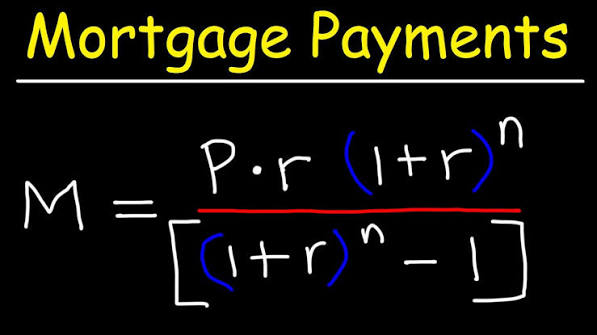
The underlying formula is standard financial mathematics, but you do not need to do the algebra by hand to use the result. What matters is that the calculator assumes a fixed rate and a regular payment schedule. If those assumptions are wrong, the schedule becomes an approximation rather than a precise plan. For the standard amortization formula, see Federal Reserve consumer guidance and Consumer Financial Protection Bureau mortgage resources.
How do you use an amortization calculator step by step?
You use it by entering the loan terms carefully, then checking the schedule for signs that the input matches the mortgage you actually have or plan to take. A clean calculator run should produce a payment that fits the stated rate and term, and a balance that reaches zero only at the end of the amortization period.
- Enter the loan amount exactly. Use the amount you will borrow, not the purchase price. For a $400,000 home with a 20% down payment, the loan amount is $320,000, not the full price. Verify the number matches the lender’s note or loan estimate. If the calculator uses the wrong base amount, every payment and balance will be off.
- Choose the interest rate in annual percentage form. Enter the nominal annual rate, such as 6.25%, unless the calculator specifically asks for a monthly rate. Verify whether the rate is fixed or adjustable. If you cannot tell which one it expects, the schedule may look plausible while being wrong.
- Select the term in years or months. Standard terms are often 15, 20, or 30 years, which equals 180, 240, or 360 monthly payments. Verify the calculator uses the same unit you entered. A 30-month error is not small; it changes the payoff timeline completely.
- Set the payment frequency. Most mortgage calculators assume monthly payments. If your loan uses biweekly payments, that is 26 payments a year, not 12. Verify the frequency before reading the result. If the calculator cannot handle your payment cadence, the payoff date will be misleading.
- Check whether fees and escrow are included. A true amortization calculator usually handles principal and interest only. Verify whether property tax, homeowners insurance, and mortgage insurance are excluded. If they are bundled in, the payment shown is a housing payment, not a pure loan payment.
- Review the first payment breakdown. Look at how much goes to interest and how much to principal in month 1. Verify that the interest is roughly the monthly rate applied to the opening balance. If the principal looks too large or too small, one of the inputs is probably wrong.
- Scroll to the midpoint and the final payment. Compare the balance after 60 months on a 30-year loan, or after 180 months on a 15-year loan, with what you expect. Verify that the balance declines steadily and reaches zero only at the end. If the balance goes negative or never reaches zero, the payment assumptions are off.
- Add extra principal only if the calculator allows it. Specify a fixed extra amount, such as an additional $100 or $250 per month, and see how the payoff changes. Verify that the tool applies extra principal to the balance, not to interest. If the payoff date does not move, the calculator is not applying the extra payment correctly.
The most useful check is simple: a standard fixed-rate mortgage should show declining interest and rising principal over time, with a total of monthly payments equal to the term only if you make no extra payments. If the pattern looks flat or erratic, I would recheck the rate format, the term units, and whether the calculator expects percent or decimal input. For more on loan estimates and rate inputs, see CFPB loan estimate guidance and Fannie Mae education resources.
What the schedule tells you that a monthly payment alone does not
The schedule tells you how much of the loan you will still owe after any given payment, and that is often the detail people really need. A single monthly payment figure can hide the cost of waiting. An amortization table makes the time value of the loan visible in plain rows.
The first thing it shows is how slowly principal falls at the start. On a long-term mortgage, that early stretch can surprise borrowers who expected the balance to drop quickly. The calculator makes that visible month by month. It also shows total interest over the life of the loan, which is usually much larger on a longer term than on a shorter one, even when the monthly payment is lower.
That trade-off matters. A 30-year mortgage usually gives you a lower required payment than a 15-year mortgage on the same balance, but the longer term spreads interest over more time. A mortgage amortization calculator lets you compare those shapes rather than guessing from the headline payment.
It also helps with refinancing questions. If you are 7 years into a 30-year loan, the calculator can show the remaining balance and the remaining term. That matters because the benefit of a refinance depends on where you are in the schedule, not just on the new rate. Near the end of the loan, the remaining interest may be small enough that refinancing fees overwhelm the benefit.
I also think the mortgage amortization calculator is the clearest way to understand extra payments. A small amount of extra principal early in the term can shorten the payoff timeline more than the same amount added later, because it reduces the balance on which future interest is charged. The calculator does not promise savings; it shows the mechanical effect of smaller balances over time. See also CFPB mortgage refinance guidance and Freddie Mac’s refinance resources.
When should you not rely on a standard amortization calculator?
You should not rely on a standard calculator when the loan does not behave like a plain fixed-rate mortgage. In those cases, the schedule can mislead you more than it helps.
Adjustable-rate mortgage with a reset after 1, 3, 5, or 7 years: the rate can change later, so a fixed schedule is only a snapshot — use a calculator that handles rate adjustments or ask the lender for an ARM disclosure.
Interest-only period for 3, 5, or 10 years: the balance may not fall during the early years — a standard amortization table will overstate how much principal you repay early on.
Balloon payment at maturity: part of the debt is deferred to the end — you need a payoff schedule that includes the final lump sum, not a conventional full-amortization model.
Negative amortization loan: unpaid interest may be added to the balance — the loan can grow instead of shrink, and a normal calculator will give the wrong impression of progress.
Biweekly or accelerated payment structure with lender-specific rules: the timing of payments changes the interest math — use the lender’s schedule or a calculator built for that cadence.
Loan fees, mortgage insurance, or escrow are the real question: the calculator may show principal and interest only — if you need your full monthly housing cost, you need a broader budget view.
Each of these situations changes the meaning of the payment. The wrong tool can make a loan look cheaper, faster to repay, or simpler than it really is. If you are comparing a fixed-rate 30-year loan to anything with resets, balloons, or interest-only phases, I would not trust a plain amortization table on its own.
The mistakes people actually make with amortization calculators
People usually make the same 5 mistakes, and each one can change the result enough to distort a mortgage decision.
-
Entering the home price instead of the loan amount. The consequence is inflated payments and a false sense of affordability. The correct input is the amount borrowed after the down payment.
-
Using the annual rate as if it were already monthly. The consequence is a payment that is far too high or too low. The correct approach is to enter the rate in the format the calculator expects, usually annual percent, and let the tool convert it.
-
Forgetting that monthly payment is not total housing cost. The consequence is underbudgeting by hundreds of dollars in some markets, because tax, insurance, and mortgage insurance may sit outside principal and interest. The correct alternative is to separate loan payment from escrow and other housing costs.
-
Ignoring extra-payment rules. The consequence is overstating savings or payoff speed. Some lenders apply extra principal only if it is marked correctly, so the correct alternative is to confirm how the lender allocates overpayments.
-
Treating an amortization schedule like a forecast of life circumstances. The consequence is poor planning around refinancing, moving, or variable income. The correct alternative is to use the calculator as a model of the loan, not a prediction of your future; for anything beyond the schedule, consult a qualified mortgage professional.
-
Comparing loans only by monthly payment. The consequence is choosing a lower payment with much higher lifetime interest. The correct alternative is to compare payment, term, and total interest together.
These errors are common because the calculator looks simple. The math is simple in one sense, but the loan terms around it are not.
What should you check before you trust the result?
You should check that the calculator matches the loan contract on four points: amount, rate, term, and payment timing. A mismatch on any one of those can make the schedule wrong even if the rest looks fine.
I would also check the output against one rough sanity test: on a standard fixed-rate mortgage, the first payment should contain more interest than principal, and the final payment should be the opposite. If that pattern is missing, something in the setup is off.
A second check is the payoff date. A 30-year loan entered as 360 monthly payments should end roughly 30 years from the start date if there are no extra payments. If the calculator shows an earlier end date without extra principal, it may be using a different compounding rule or an off-by-one payment convention.
A third check is whether the calculator rounds each row. Some tools round payment components to the nearest cent in each month, which can create tiny end-of-term differences. That is normal. A difference of a few cents is not the same as a difference of months.
If you are comparing lenders, I would not stop at the calculator. Ask for the loan estimate or equivalent disclosure required in your country, because local rules differ and fees can change the real cost materially. A mortgage amortization calculator tells you how the loan amortizes; the lender disclosure tells you what the loan actually costs. For U.S. disclosures, see CFPB loan estimate information and HUD consumer resources.
What questions do people usually ask next?
A mortgage amortization calculator does not answer everything, but it answers the first question cleanly: how is my payment being applied over time?
Does extra principal always save interest? Usually, yes, because it reduces the balance that future interest is charged on. That said, the size of the savings depends on loan terms, timing, and whether the lender applies overpayments to principal the way you expect.